


-
Calculating the count and total area of selected polylines, circles, arcs, splines, and hatches
Launch Options
- ModPlus floating menu or palette
- AutoCAD ribbon
- Command line: _mpSumArea
Icon


Related News and Articles
Using
The plugin calculates the total area of selected polylines, circles, arcs, splines, and hatches. Objects can be selected either before launching the plugin or while the plugin window is open. Calculation results are displayed in the plugin window:
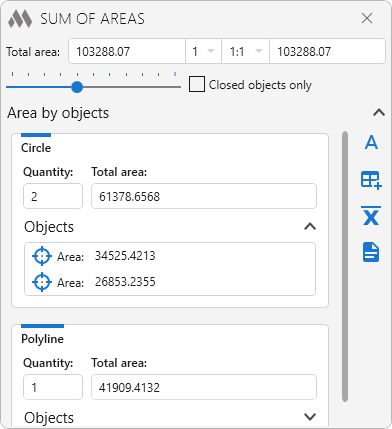
The upper part of the plugin window displays the total area of the selected objects, the multiplier, the scale, and the final area calculated using the multiplier and scale. The final value field cannot be edited manually. Clicking it copies the final value to the clipboard.
When applying a scale to an area, it is important to note that the area changes proportionally to the square of the scale factor, not linearly. For example, if the area is 100 at a scale of 1:1, it will be 25 at a scale of 1:2, not 50.
When entering multiplier and scale values manually, either a period or a comma can be used as the decimal separator.
Closed objects only – when enabled, the plugin processes only objects that form a closed contour.
The contents of the Area by objects section, as well as the blocks for individual object types, can be collapsed and expanded using the buttons on the right side of the corresponding headers.
 – insert the result as single-line text:
Insertion point: – specify the insertion point for the single-line text.
 – insert the result into a table cell:
Select table: – select a table.
Select cell: – select the cell in which to insert the result.
 – export the arithmetic mean (including rounded results) for each object type and for all selected objects to a TXT file.
 – export the result to a TXT file.
Objects – list of selected objects.
 – zoom to fit the current object on the screen.
The
.png) button in the upper-right corner opens the plugin settings:
button in the upper-right corner opens the plugin settings: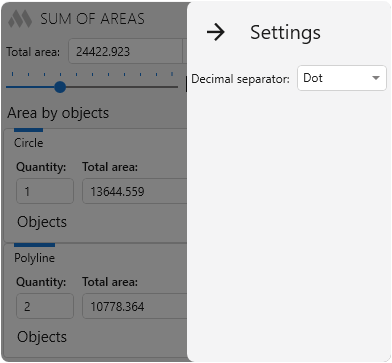
Decimal separator – specifies the decimal separator used when displaying results.
-
Change history forYear
2026 Year
AutoCAD: Sum of areas 1.4.10.0 (15.10.2026)
NewAdded the choice of the decimal separator.NewAdded copying of the total value to the clipboard by clicking the result field.NewAdded the ability to collapse the window content.ImprovedAdded the ability to use both a dot and a comma to separate the fractional part in coefficients.ImprovedProhibited manual editing of the field with the total value.FixFixed an error where fractional coefficients were not saved when the window was opened again.FixFixed an error where a fractional coefficient selected from the list was not applied with some Windows regional settings.FixFixed an error where a scale with a fractional part gave an incorrect total value with some Windows regional settings.AutoCAD: Sum of areas 1.1.5.0 (11.09.2026)
ImprovedThe interface was migrated to the current version of the ModPlus styling library.AutoCAD: Sum of areas 1.1.4.0 (24.06.2026)
FixFixed a bug causing AutoCAD to shut down when switching to the start tab for document selection.2025 Year
AutoCAD: Sum of areas 1.1.3.0 (04.12.2025)
NewMessages have been added when selecting unsupported hatches.AutoCAD: Sum of areas 1.0.3.0 (04.06.2025)
ImprovedAdded support for Polyline3d, Polyline2d.2024 Year
AutoCAD: Sum of areas 1.0.1.0 (26.12.2024)
NewAdded the area of all objects to the export of results to a txt file.AutoCAD: Sum of areas 1.0.0.0 (04.09.2024) Read more
ReleaseRelease. -