Icon
Related news and articles
Using
The plugin is designed to automatically create and update apartment plans. Apartments are identified by grouping rooms using a common identifier, after which a separate floor plan is created for each apartment with the view boundary defined by the outer contour of the walls.
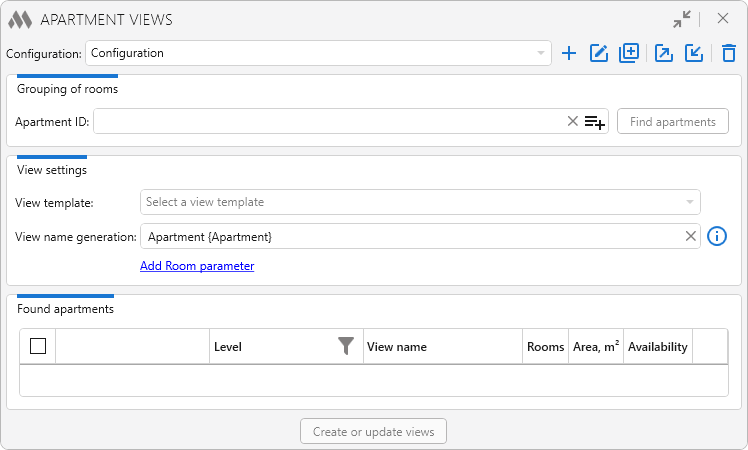
At the top of the plugin window is the configuration drop-down list. The buttons to the right allow you to create a new configuration  , rename
  , duplicate
  , export
  , import
  , or delete
  the current configuration.
To group rooms into apartments, specify the Apartment ID — the room parameter used to combine rooms into a single apartment.
The Find apartments button searches for rooms, groups them by the selected identifier, and populates the list of detected apartments in the lower part of the plugin window.
View template — specifies the template to be applied to all created views.
View name generation — allows you to define the naming pattern for the created views. The pattern can include arbitrary text, room parameter values, and the {Apartment} expression to insert the value of the parameter selected in the Apartment ID field.
Add Room parameter — opens the room parameter selection dialog for adding a parameter to the view name pattern. The parameter value is taken from the first room in the apartment.
After the search is completed, the lower part of the window is populated with the list of detected apartments.
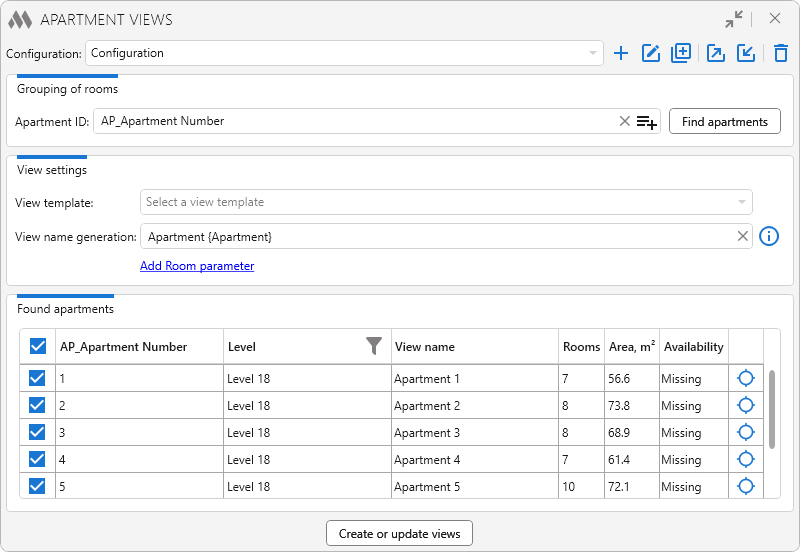
For each apartment, the following information is displayed:
- Apartment ID value
- level on which the apartment is located, with the ability to filter the list by levels.
- name of the view to be created
- number of rooms in the apartment
- total area of the apartment rooms
- status indicating whether an apartment view already exists, with the option to open the floor plan
- button for selecting the apartment rooms on the floor plan.
The check box in the first column allows you to select the apartments for which views should be created or updated.
Create or update views — creates new apartment plans or updates existing ones. During an update, the view boundary, view name, and assigned view template are updated according to the current configuration settings.