


-
Generating QR codes from links in element parameters
Icon


Related news and articles
Using
The plugin is designed to automatically create QR codes based on links stored in element parameters and save the resulting images to Revit parameters.
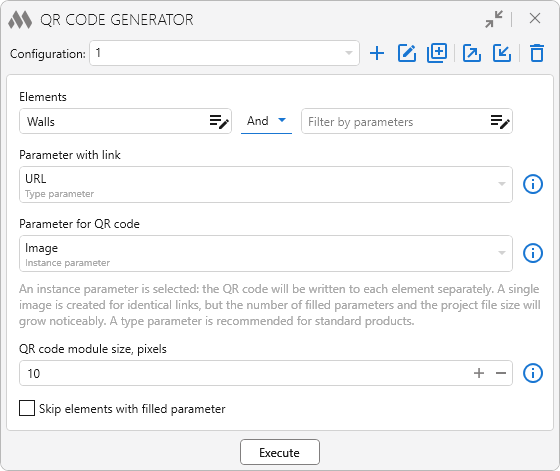
To start working with the plugin, create a configuration by clicking
 . Created configurations can be duplicated
  , renamed
  , exported
  , imported
  , and deleted
  using the corresponding buttons.
Elements for which QR codes need to be created can be specified using the elements filter. If the filter is empty, all elements in the current project will be processed.
Parameter with link – a parameter with the "URL" data type whose value is used to create the QR code. An instance parameter or a type parameter can be selected. If the parameter with the link is empty, a QR code is not created for the element, and information about the element is displayed in the processing results.
Parameter for QR code – a parameter with the "Image" data type to which the created QR code image will be written. An instance parameter or a type parameter can be selected.
When an instance parameter is selected, the QR code is written to each element separately. For identical links, only one image is created, but a large number of populated instance parameters can significantly increase the project file size. For standard products, it is recommended to use a type parameter.
QR code module size, pixels – specifies the size of one QR code module in pixels and affects the resolution of the created image. The higher the value, the better the QR code can be read when printed, but the more the project file size increases. The module size does not affect the size of the QR code in a schedule – it is determined by the settings of the corresponding column.
Skip elements with filled parameter – excludes from processing elements for which the parameter used to store the QR code is already filled.
Execute – starts processing the elements that match the specified filters. For each element, the plugin retrieves the link from the specified parameter, creates a QR code based on it, and writes the resulting image to the selected parameter.
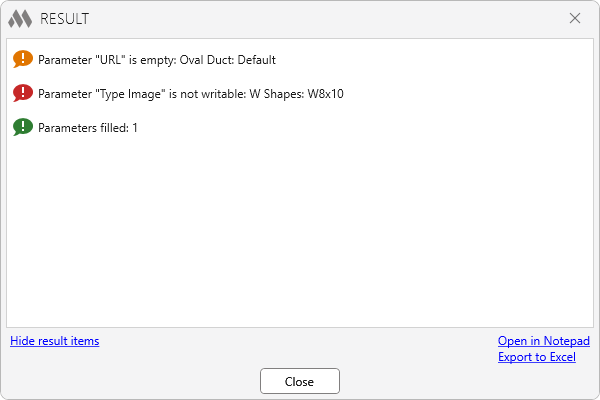
After processing is complete, a window with the plugin operation results opens:
-
-
Change history forYear
2026 Year
Revit: QR code generator 1.0.0.0 (07.09.2026) Read more
ReleaseRelease. -