


-
Управление секущим диапазоном плана с помощью слайдеров
Значок


Связанные новости и статьи
Использование
Плагин предназначен для быстрого управления параметрами секущего диапазона текущего плана. Позволяет изменять границы видимости с помощью слайдеров без открытия стандартного окна настройки секущего диапазона.
После запуска плагина открывается окно настройки секущего диапазона текущего вида.
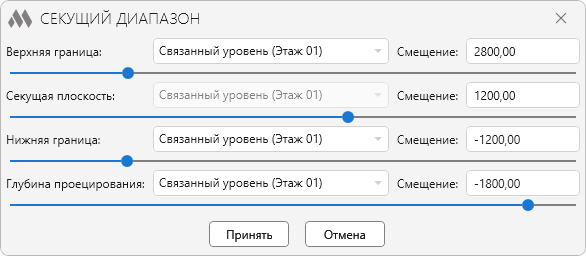
В плагине доступны следующие настройки:
- Верхняя граница – верхняя граница основного секущего диапазона плана
- Секущая плоскость – положение секущей плоскости
- Нижняя граница – нижняя граница основного секущего диапазона плана
- Глубина проецирования – глубина отображения элементов ниже нижней границы
Для каждой границы можно задать:
- Уровень
- Смещение относительно уровня. Смещение можно задать как числом, так и формулой вида: "=арифметическое выражение". Например:
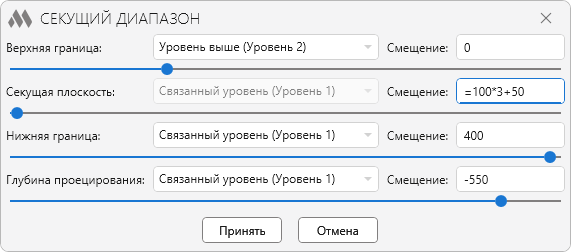
Значение смещения можно изменять с помощью слайдера, перемещая его вправо или влево. Изменения сразу отображаются на текущем плане, что позволяет наглядно контролировать положение границ.
Кнопка Принять применяет заданные настройки к текущему виду. Если настройки секущего диапазона управляются шаблоном вида, изменения будут внесены в шаблон.
-
-
История изменений заГод
2026 Год
Revit: Секущий диапазон 1.1.3.0 (09.10.2026)
ImprovedДобавлена возможность перемещать слайдеры колесом мыши.Revit: Секущий диапазон 1.1.2.0 (22.09.2026)
ImprovedИнтерфейс переведён на актуальную версию библиотеки оформления ModPlus.Revit: Секущий диапазон 1.1.1.0 (29.05.2026)
FixИсправлена ошибка, при которой шаблону вида присваивался неправильный секущий диапазон.Revit: Секущий диапазон 1.1.0.0 (20.05.2026)
NewДобавлена работа с планом потолка.Revit: Секущий диапазон 1.0.0.0 (11.05.2026) Подробнее
ReleaseРелиз. -