


-
Plan view range control with sliders
Icon


Related news and articles
Using
The plugin is designed for quick control of the view range parameters of the current plan. It allows you to adjust visibility boundaries using sliders without opening the standard View Range settings dialog.
After launching the plugin, a window for configuring the view range of the current view is opened.
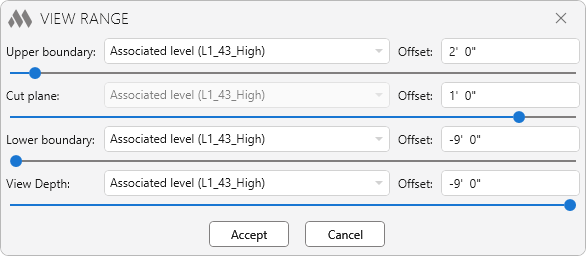
The plugin provides the following settings:
- Upper boundary – upper boundary of the primary view range
- Cut plane – position of the cut plane
- Lower boundary – lower boundary of the primary view range
- View Depth – depth of elements displayed below the bottom boundary
For each boundary, you can specify:
- Level
- Offset relative to the level. The offset can be specified either as a number or as a formula in the format: "=arithmetic expression". For example:
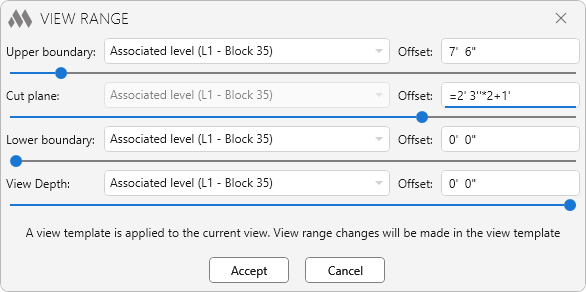
The offset value can also be adjusted using a slider by moving it left or right. Changes are instantly reflected on the current plan, allowing visual control of boundary positions.
The Accept button applies the specified settings to the current view. If the view range is controlled by a view template, the changes will be applied to the template.
-
-
Change history forYear
2026 Year
Revit: View range 1.1.3.0 (09.10.2026)
ImprovedAdded the ability to move sliders with the mouse wheel.Revit: View range 1.1.2.0 (22.09.2026)
ImprovedThe interface was migrated to the current version of the ModPlus styling library.Revit: View range 1.1.1.0 (29.05.2026)
FixFixed an error where an incorrect view range was assigned to the view template.Revit: View range 1.1.0.0 (20.05.2026)
NewAdded support for ceiling plan.Revit: View range 1.0.0.0 (11.05.2026) Read more
ReleaseRelease. -