Creating, storing, and adding layer sets, text styles, dimension styles, and multileader styles
Call options
- ModPlus floating menu or palette
- Menu, toolbar, or ribbon in nanoCAD
- Command line: _mncStandards
Icon
Using
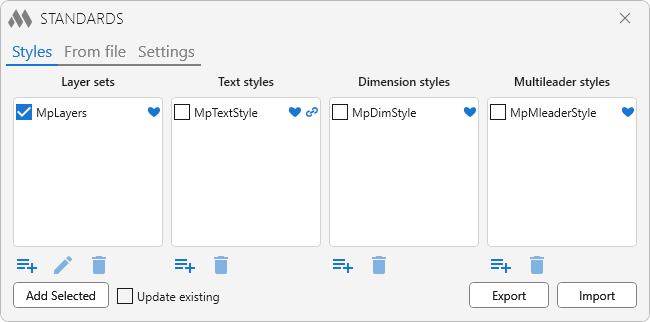
The tab contains 4 lists for work: Layers set, Text styles, Dimension styles, Multileader styles. Each set contains standard ModPlus styles that can not be edited or deleted.
To work with lists, use the following buttons:
 |
– delete the selected style from the list |
 |
– opens a window for creating a new set of layers or a window for selecting styles from the current drawing to add to the appropriate list |
 |
– edit a set of layers in a special window |
| |
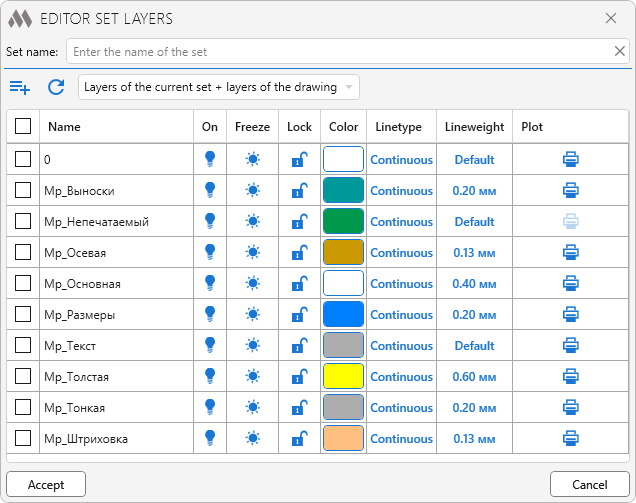
To add/remove layers in a set, use the checkbox in the first column.
There is a possibility to create a layer and edit the basic layer settings (Name, On, Freeze, Lock, Color, Linetype, Lineweight, Plot). |
Add selected – Adding the selected styles to the current document.
Update existing – if the current drawing already has layers or styles with the same names as the added one, their properties will be updated if this option is enabled.
Export – Export of all styles except standard ModPlus styles to an xml file.
Import – Import styles from the specified xml file.
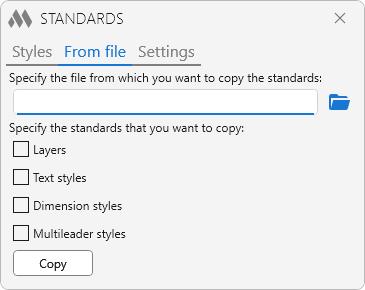
 |
– specify the file from which you want to copy the standards. |
On this tab you can copy the selected standards from the specified file.
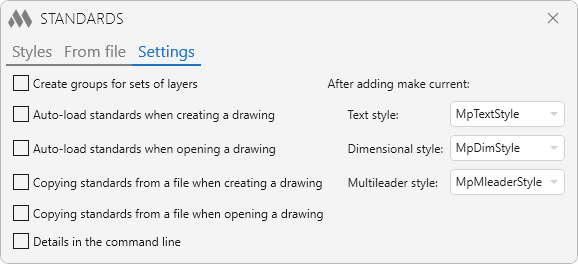
The tab contains various settings for the plugin. Editing settings is only available in the full version of the plugin.


