


-
Fast copying of single line or multiline text content, mleaders, dimensions or table cells
Call options
- ModPlus floating menu or palette
- Menu, toolbar, or ribbon in nanoCAD
- Command line: _mncTxtCopyPaste
Icon


Using
The plugin works in cycles – i.e. actions are repeated until the user completes the command by pressing Space, Enter or Esc.
Select source entity (text, mleader, table or dimension) or [Delete]: – selection of the source entity from which the text content will be taken. Or mode Delete selection.
Select entity (text, mleader or table) to replace the content: – selecting an entity whose contents will be replaced by the contents of the source entity. If the Delete mode is enabled, the source entity will be deleted. If the source entity was a table, the contents of the cell will be deleted.
If you select a table, a prompt appears to indicate the cell.
Delete
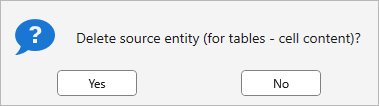
Yes – source entity (or the contents of a table cell) will be deleted.
No – source entity (or the contents of a table cell) will not be deleted.
Default value – No. The selected value is saved in the current drawing.
-