


Revit. Numbering 7.0. Numbering along route, composite number by mask and other new features
We present to you a big update of the Numbering plugin, version 7.0!
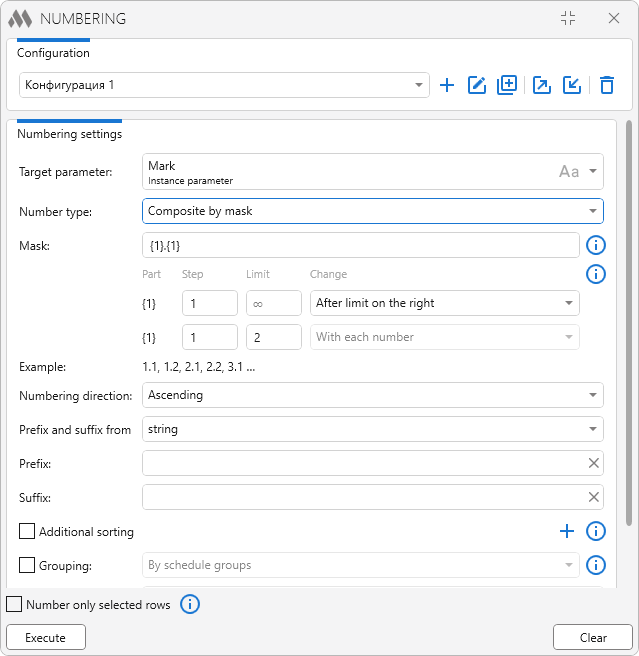
The new version brings you the numbering of elements along the route of pipes and ducts, a composite number by a mask, numbering by schedule groups, additional sorting, numbering through the renaming of types and families and much more. And the plugin window no longer blocks the Revit window!
We will tell you about all of this below
Let us start with the plugin window. It is now non-modal, and you can work with the model without closing the plugin. At the same time the plugin takes the switching between views into account: if you go to another schedule with different settings or switch from a view to a schedule and back, the plugin will track it. And if you change the settings of the schedule while the plugin window is open, the settings of the plugin will change as well.
Numbering along the route
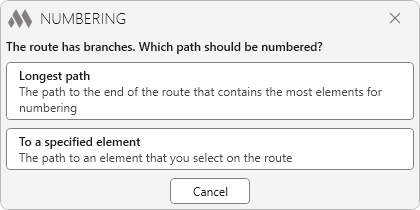
A new variant of selecting elements has been added for the work on a view — Along route. It allows you to number the elements of a pipe, duct, cable tray or conduit run along the route — from the selected element to the end of the route. If the route has branches, you will be able to choose which path to follow further:
Composite number by a mask
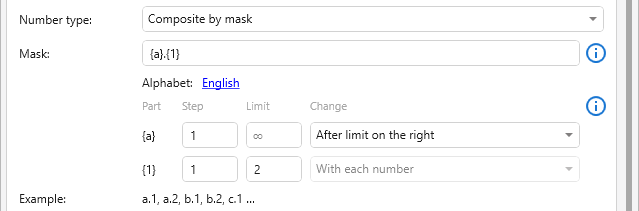
You can now number with a composite number by a mask, for example 1.1.1, and set its own limit for each part of the number. Such numbering is available when writing the number to a text parameter — both on a view and in a schedule:
Numbering in a schedule
Several new features have appeared at once for the work in a schedule.
You can now number the elements by the groups that are formed by the sorting/grouping settings of the schedule itself:

Additional sorting of the elements by several parameters has also been added. If the sorting levels in the settings of the schedule are not enough for you, the missing levels can be set right in the plugin:

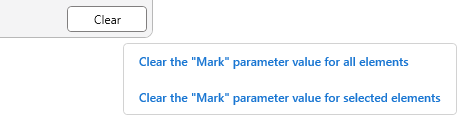
And you can now also clear the value of the parameter only for the selected rows of the schedule:
Numbering through the renaming of types and families
The number can now be written directly into the name of the type or the family of an element. To do this you need to select "Type Name" or "Family Name" as the parameter for writing the number, and the plugin will rename the type or the family. It works both on a view and in a schedule.
Continue numbering
The Continue numbering button has appeared next to the Initial value field. It inserts the next value after the last numbering performed in the same mode — on a view or in a schedule. There is no longer any need to recall the number you stopped at!

Spline processing
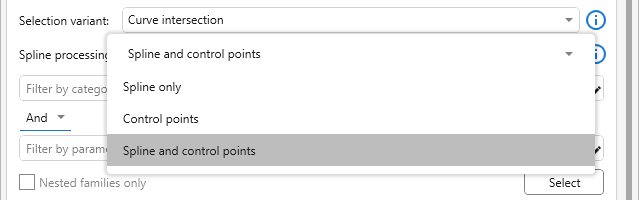
The Spline processing setting has been added for the selection of elements by curve intersection. With its help you can look for the intersection with the spline, with a polyline through its control points or with both at once:
Other
- export, import and duplication of configurations have been added
- the Nested families only option has been added for the work on views
- in a schedule without the Itemize every instance option an explanation is now displayed in place of the settings of grouping by a parameter
- the Number only selected rows option is now not hidden but becomes unavailable, and a tooltip with the conditions of its availability has appeared next to it
- the error because of which the selected digits in the Initial value field could not be replaced with letters and vice versa has been fixed
We hope that with the new version of the plugin numbering elements will become even more convenient! And do not forget to write your ideas and suggestions to us in the support chat!
Enjoy your work with ModPlus!